Jerry: a voice terminal on an ESP32-S3
In early October a small parcel arrived: a Freenove ESP32-S3 Display, a 2.8" touchscreen board with a microphone, a speaker and an ES8311 audio codec on it. The idea was simple. I already run an AI agent on a server; I wanted a physical thing on the desk I could just talk to. Say a word, ask a question, hear the answer. No phone, no browser tab.
Two weeks and three firmware rewrites later it works, and it answers to the name “Jerry”. Here is the short version of how it got there.
The board
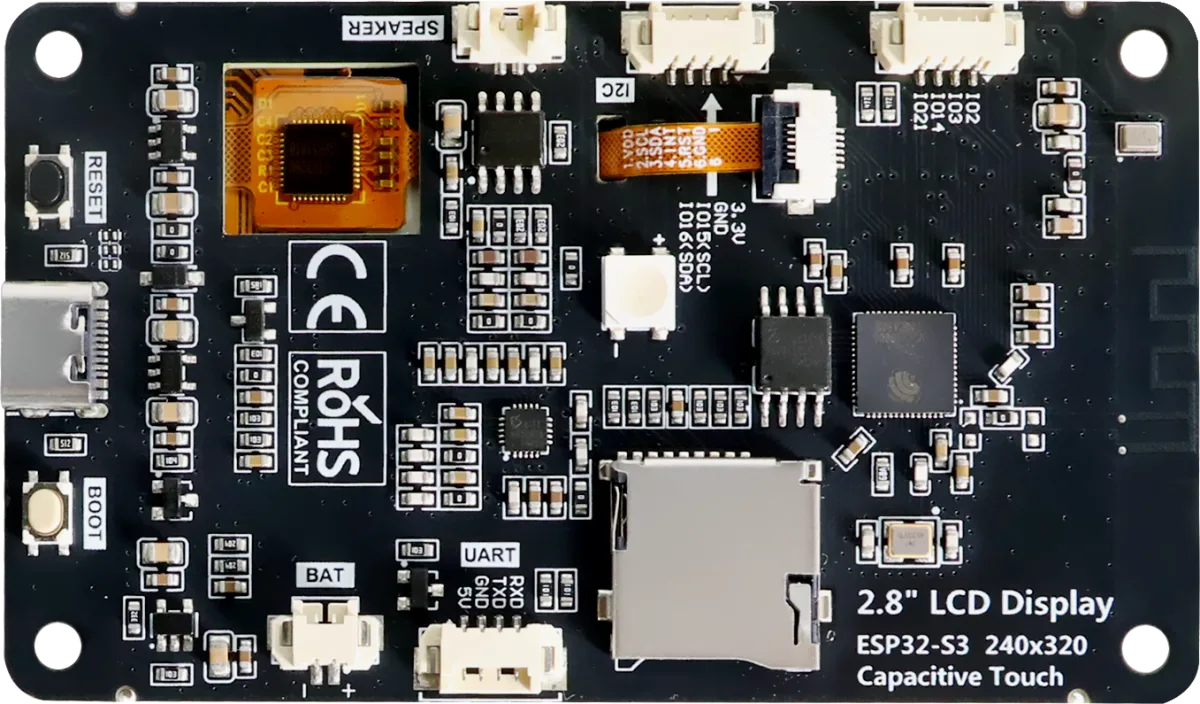
The back of the board: ESP32-S3 module on the right, codec and amplifier in the middle, speaker and battery connectors, microSD, USB-C. Photo: Freenove, CC BY-NC-SA 3.0
The ESP32-S3 is a dual-core microcontroller at 240 MHz with Wi-Fi, vector instructions for DSP work, and on this module 8 MB of PSRAM next to 16 MB of flash. For a microcontroller that is a lot. For “run a wake-word model, cancel echo, hold a TLS connection and render a UI at the same time” it is, as it turned out, not quite enough. Internal RAM is the real limit: PSRAM is slow and some things, like Wi-Fi and TLS buffers, want the fast memory.
Attempt one: do it like a phone
The first firmware, on ESP-IDF, was a fairly fat client. It streamed PCM over a WebSocket to a voice bridge in front of an OpenAI Realtime session, rendered a chat on the screen, and later tried to detect the wake word on the board itself with Espressif’s own speech models.
It worked, mostly. It also stuttered on long answers, lost the first sentence of a conversation now and then, dropped the connection when the TLS stack panicked under load, and the on-board wake word was slower than the server-side one, not faster. Every feature I added competed for the same internal RAM.
Attempt two: someone else’s firmware
I switched the back end to OpenClaw, an open-source agent gateway with its own ESP32 node firmware. Their audio pipeline is excellent: the full-duplex handling and echo cancellation are clearly done by people who know audio. Their UI is not for me, and bending their firmware to my screen and my flow turned into a fight with code I did not own.
So I tried a third way: my own OpenClaw client on the board, with wake word, acoustic echo cancellation, Ed25519 signatures and JSON-RPC all on the chip. The board did not cope. That was the moment the architecture became obvious.
Attempt three: a thin board and a bridge
The board now does three things and nothing else. It sends microphone audio, plays whatever it receives, and draws the screen. Twenty-millisecond PCM frames, continuously, even silence. Every decision lives in a small Rust service I call the bridge.
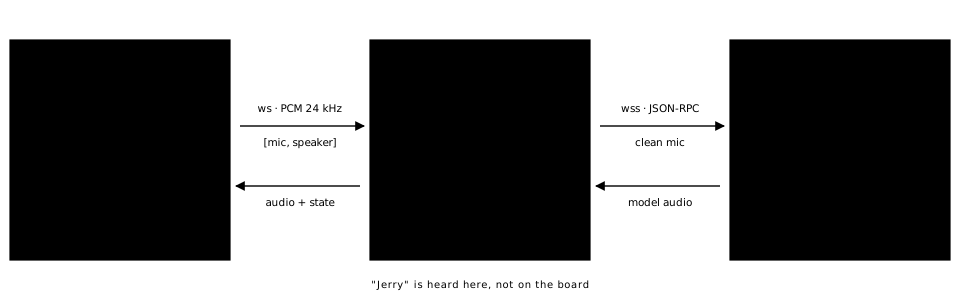
What runs where. The board is a microphone, a speaker and a screen; the bridge makes every decision; the gateway holds the session with the speech model.
The bridge:
- Wake word with openWakeWord on ONNX Runtime. The board streams audio all the time; the bridge listens for the word.
- Sessions with the agent gateway: open on the word or a button, close after 20 seconds of silence or on request.
- Pacing. The model’s audio arrives in bursts faster than real time; the bridge meters it out at 1x with a small lead so interrupting stops playback within a quarter of a second.
- Echo cancellation. The board sends a stereo frame: the mic channel and the speaker channel it played in the same I2S tick. The bridge subtracts the echo with speexdsp and forwards a clean mic to the model. You can talk over the assistant and it stops.
The firmware shrank by a factor of several, memory stopped being a topic, and the bridge is ordinary server software I can test with a WAV file and no hardware.
Teaching it “Jerry”
Pretrained wake-word models know “Hey Jarvis”. They do not know “Jerry”, and especially not “Jerry” said in Russian. So I trained one locally on a Mac: synthetic samples from Piper TTS, a few dozen recordings of my own voice, background noise and room impulse responses, then openWakeWord’s training pipeline. The first model caught the English pronunciation and ignored the Russian one entirely. The second, with my own recordings mixed in, catches 4 of 4 held-out samples at about 0.6 false triggers per hour of noise. Good enough for a desk.
What it is like to use
The screen is a small chat, because that is what a conversation with an agent is. Mine is on the right, the assistant on the left, service messages in the middle. The header shows whether the bridge is connected to the OpenClaw gateway, how many sessions have run today and the volume. A couple of things the interface is built around, all of them specific to OpenClaw:
- The realtime layer has no hands. OpenClaw’s speech model is only a voice; anything that needs doing goes to the agent on the server, and the agent has the tools. So “Jerry, is the site up?” is a real question: the voice says “let me check”, the agent runs the check, and the answer comes back spoken and on the screen. For me that is the point of the device: a terminal to the agent that already runs my things, not a smart speaker.
- Sessions cost money. A Talk session is billed while it is open, so the interface is honest about it: a rising chirp when a session opens, a falling one when it closes, a counter in the header, “Stop” on the screen, and an automatic close after 20 seconds without anyone talking. No session lingers because someone walked away.
- You can interrupt. Talk over the assistant or press “Interrupt” and it stops within a quarter of a second; the gateway sends a clear, the bridge drops the queue, the board empties its buffer. Short back-and-forth works better than long monologues.
- It is a desk object. The BOOT button steps the volume, the screen dims after 20 seconds, and the board reconnects to the bridge by itself if the Wi-Fi hiccups. Nothing on it asks for a keyboard.
Most of this was built together with Claude Code, from the firmware to the Rust bridge to the training pipeline. The next step is moving the bridge from my laptop to the server, so the terminal works when the laptop is closed.